

















Undead Invasion

- Developer
- Independent Studio
- Load Speed
- Not specified
- Release Date
- 2025
- Added Site
- Oct 10, 2026
- Play Mode
- Single Player
- Local Players
- 1 Player
- Controls
- Keyboard & Mouse, Touch Controls
What Is Undead Invasion?
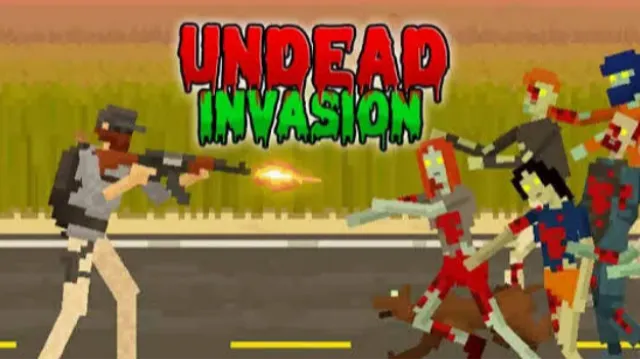
Undead Invasion is a single-player zombie survival shooter with a side-on view and blocky visuals. Fight through successive days, then use the break between attacks to buy equipment and arrange your defenses. The enemies are computer-controlled zombies, not other players.
Shooting is only part of the challenge. Barricades and traps help protect the space you need to fight, while your limited budget must cover weapons, recovery and defensive preparation. As the waves become more demanding, a poorly prepared position can be as dangerous as a missed shot.
Game Screenshots
Prepare Your Defense, Then Survive the Wave
Spend Between Attacks
In Defense, surviving and defeating zombies earns money for the next preparation phase. Choose equipment that addresses your current problem: stronger firepower for a tougher wave, recovery when injured, or defenses when enemies are reaching you too quickly. Guns, melee equipment and protective gear give you different ways to handle pressure.
Keep a Usable Fighting Space
Place barricades and traps before the attack rather than relying on your weapon alone. Barriers can hold enemies back, and traps can punish zombies approaching your position. During combat, keep enough distance to aim and reload. A kick or melee attack can help when an enemy gets too close; explosives are useful against a tightly packed group.
Experiment in Playground
The separate Playground entry lets you experiment with equipment and defensive arrangements outside a normal survival attempt. Use it to compare a layout or weapon before committing your next Defense budget.
Game Controls
Common desktop controls are listed below. Use the current game's prompts if your version uses different bindings.
- A D or ← →: move left and right
- Move Mouse: aim
- Left Click: shoot
- R: reload
- Q: switch weapon
- E: melee attack
- ␣ Space: kick
Use the on-screen preparation interface to buy and place defenses. Supported phones and tablets use touch controls; follow the buttons shown by that version.
Make Your Next Defense Last Longer
- Buy for the next threat, not just the biggest gun. If enemies keep reaching you during reloads, a barricade or recovery purchase may help more than another weapon.
- Leave room to retreat. Arrange defenses without trapping yourself in a cramped position. A protected firing lane still needs space for you to move away from approaching zombies.
- Reload before the gap disappears. Take advantage of distance or a barrier while it still separates you from the horde.
- Use close-range tools to regain space. Kick or use melee when necessary, then reposition instead of remaining beside the next zombie.
- Save explosives for a group. Several enemies packed together offer better value than a single isolated target.
- Test one change at a time. Playground is useful for finding out whether a new weapon or a different barrier layout fixes the weakness in your last attempt.
Frequently Asked Questions
Do my survival purchases carry over after I die?
No. Death ends the current Defense run, and its purchased equipment and progress reset for the next attempt. Do not treat the preparation break as a permanent checkpoint. This reset does not necessarily describe unrelated settings or leaderboard records.
Is Undead Invasion suitable for players who avoid graphic violence?
It includes graphic zombie violence and blood effects. If that is a concern, consider another game before starting. A setting that removes all graphic effects has not been confirmed.
What should I do if the game won't load, lags, shows a blank screen, or won't start?
Try one of these four steps:
- Clear your browser cache, then reload the game.
- Open the game in an incognito or private browsing window.
- Try a different browser, such as Microsoft Edge or Google Chrome.
- On the game cover, click Primary in the top-right corner and select a different game source, if available.
What should I do if matchmaking stays on "Connecting" or the loading circle keeps spinning?
Matchmaking can take longer when fewer players are online or when servers are busy. A persistent "Connecting" message can also indicate a connection or server issue. Try these options:
- Recommended: on the game cover, use the source selector in the top-right corner (usually labeled Primary) to try another available game source. This may help if the current source is having connection issues, but different sources may share the same matchmaking servers. If no other source is available, try the options below.
- Browse Similar Games on this site and try a similar game while you wait.
- Choose a Single Player game that does not require matchmaking. PvE games may also be suitable, but check that they support solo play: a PvE tag alone does not guarantee single-player or offline play.



Comments (0)