















LOLShot.io

- Developer
- Exodragon
- Load Speed
- Not specified
- Release Date
- 2022
- Added Site
- Oct 10, 2026
- Play Mode
- Online Multiplayer
- Local Players
- 1 Player
- Controls
- Keyboard & Mouse
- Perspective
- First-Person
What Is LOLShot.io?
LOLShot.io is a free online first-person shooter where fighting in the air matters as much as fighting on the ground. Rocket jumps, launching pads and teleport gates let you reposition quickly, while unusual weapons give you more options than simply aiming and firing.
Deathmatch accommodates up to 16 players. You compete for points before the timer ends, with extra rewards for stylish eliminations such as aerial kills and knocking opponents out of the arena. Defeat sends you back into the action through respawning rather than ending your run. The browser version is designed for a desktop keyboard and mouse; the official site currently does not support mobile play.
Game Screenshots
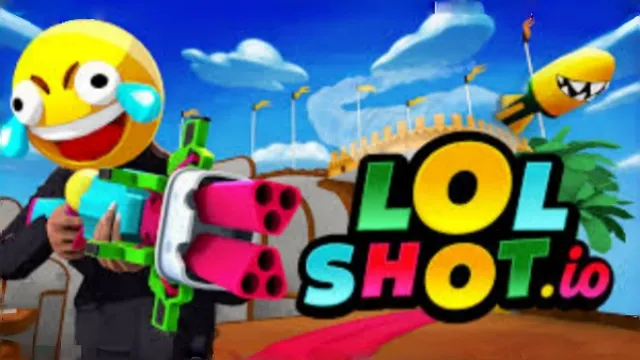
Pick Up Weapons and Control the Air
Getting Into a Match
Choose a name and server in the lobby, then join the action. If the movement feels unfamiliar, use the built-in tutorial to practise before competing. Once you spawn, find weapon pickups and learn a route between equipment, jump pads and nearby cover. Collecting weapons also replenishes ammunition, so staying close to useful pickups is part of managing a fight.
Weapons That Change Your Options
- Nailgun, Shotgun and Railgun: the Nailgun can finish distant targets, the Shotgun works best nearby, and the slower Railgun rewards a well-placed long-range hit.
- Rocket Launcher: its blast pushes players and does not deal self-damage. Use that impulse for rocket jumps or to threaten enemies near an arena edge.
- Flamethrower: provides thrust in the air and leaves damaging fire, but can hurt its user. It is a movement tool as well as a weapon, not a risk-free jetpack.
- Lifegun: drains opponents to restore your health. You need to stay within its limited range with a clear line to your target.
Routes, Power-Ups and Rewards
Teleport gates offer quick changes of position, while jump pads make otherwise awkward platforms accessible. Magic Milk gives a short threefold damage boost: treat its location as a contested objective, not just another pickup. XP, unlockable skins, coins and special-action badges provide longer-term goals; the post-match review helps you see how your fighting and style bonuses contributed.
Game Controls
- W A S D: move
- Move Mouse: look around and aim
- Left Click: fire
- ␣ Space or Right Click: jump
- 1–8: select a weapon
- Scroll Wheel: cycle weapons
- Esc: open the menu and settings
You can change key bindings and sensitivity in settings. Follow the weapon shortcuts shown in your current game rather than relying on an old weapon-slot list.
Make Your Movement Count
- Plan where you will land. Before taking a pad or rocket jump, identify your next platform and weapon pickup. Height helps less if you land without ammunition in an exposed spot.
- Switch for the distance. Do not chase a faraway target with the Shotgun. Change to a longer-range weapon, then switch back when the gap closes.
- Use knockback near edges. A rocket blast or Railgun hit can force an opponent off a platform. Watch your own escape route so a counterattack does not do the same to you.
- Break a Lifegun's line. If someone is draining you, move behind an obstacle or increase the distance. Remaining in clear view lets them recover while damaging you.
- Check both exits of a portal route. Teleporting can create a flank, but the paired gate is also a route opponents can use to return. Do not assume the area behind you is safe.
- Make a damage boost useful. With Magic Milk active, seek a reachable fight rather than spending its short duration travelling across the map.
Frequently Asked Questions
How can I join a friend's game?
Use the game's Copy Link invitation or share the current game URL from the address bar. Your friend should open that invitation rather than independently joining a random match. In an embedded game, use the game's own invitation control; copying the surrounding website's page address is not the same as copying a match link.
Do I need an account to play, and how do I keep my unlocks?
Guest play is available. If you want to retain skins, progress and purchases, use the game's sign-in option. Saving in LOLShot.io is separate from this website's local favorites or browsing history, and depends on the game's account service working.
Where do I equip a newly unlocked skin or badge?
Claim the reward, leave the match and open customization from the game's home screen. Select the appropriate appearance or badge category there; the end-of-match reward screen is not the equipment editor.
Why does my mouse stop controlling the view?
The game needs permission to lock the pointer. Click back into the game and accept the browser's pointer-lock request. If you previously denied it, check the site's permissions beside the address bar. After leaving a menu, focus the game again before trying to aim.
Can I aim down sights instead of using right-click to jump?
The official update notes added aim-down-sight support for the Nailgun and Railgun, with its binding assigned in settings. Configure that action there instead of assuming right-click is the default aiming key. This does not imply that every weapon has a scoped aiming mode.
What should I do if the game won't load, lags, shows a blank screen, or won't start?
Try one of these four steps:
- Clear your browser cache, then reload the game.
- Open the game in an incognito or private browsing window.
- Try a different browser, such as Microsoft Edge or Google Chrome.
- On the game cover, click Primary in the top-right corner and select a different game source, if available.
What should I do if matchmaking stays on "Connecting" or the loading circle keeps spinning?
Matchmaking can take longer when fewer players are online or when servers are busy. A persistent "Connecting" message can also indicate a connection or server issue. Try these options:
- Recommended: on the game cover, use the source selector in the top-right corner (usually labeled Primary) to try another available game source. This may help if the current source is having connection issues, but different sources may share the same matchmaking servers. If no other source is available, try the options below.
- Browse Similar Games on this site and try a similar game while you wait.
- Choose a Single Player game that does not require matchmaking. PvE games may also be suitable, but check that they support solo play: a PvE tag alone does not guarantee single-player or offline play.





Comments (0)