
















2v2.io

- Developer
- LEGION GAMES
- Load Speed
- Fast (0–60 sec)
- Release Date
- Jan 9, 2024
- Added Site
- Dec 19, 2025
- Play Mode
- Single Player, Online Multiplayer
- Local Players
- 1 Player
- Controls
- Keyboard & Mouse, Gamepad, Touch Controls
- Perspective
- Third-Person
What Is 2v2.io?
2v2.io is an online 3D third-person shooter built around quick team fights. It combines gunplay, battle royale survival, and instant construction, letting you place walls, ramps, and other structures while a firefight is still happening.
The blocky cartoon presentation keeps the action easy to read, while the mix of aiming, building, positioning, and teamwork gives each round a high skill ceiling. You can launch the game directly in a modern browser, then choose from competitive and practice-focused modes available in the current lobby.
Who Made 2v2.io?
2v2.io was developed by LEGION GAMES, a studio focused on multiplayer browser games and also associated with titles such as Kour.io, Poxel.io, and Plundur.io. This game carries that fast online style into a build-and-shoot format where resource use and spatial control matter alongside reflexes.
Beyond individual matches, the current game includes progression features such as login rewards, daily and weekly tasks, achievements, a shop, an inventory, leaderboards, and clans. Rewards can include coins, gems, experience, chests, or cosmetic items, although the exact selection may change as the live version is updated.
Game Screenshots

How Does 2v2.io Play?
The core match loop
- Find weapons, ammunition, and building materials.
- Stay close enough to your teammate to trade shots or provide cover.
- Use your weapons to weaken an enemy while building cover against return fire.
- Claim height with ramps or edit structures to create a safer angle.
- Rotate before the safe zone closes and avoid being trapped in the open.
- Focus the same target when possible, then use the numbers advantage to finish the fight.
- Outlast the remaining players or teams under the rules of the selected mode.
Building during combat
Building does not pause the battle. A quick wall can block incoming shots and create time to reload, heal, observe, retreat, or counterattack. Ramps help you take height, while roofs and edited structures can reduce exposure from above or open an unexpected shooting angle. Materials are limited in competitive rounds, so every piece should solve a clear problem.
Available game modes
Mode availability can change with the current version and server rotation, but the lobby may include:
- 1v1: a direct duel focused on individual aim, building, and editing.
- Zone Wars: a fast simulation of a moving battle royale endgame.
- FFA: a free-for-all arena where every other player is an opponent.
- 2v2: the signature doubles mode, pairing two teammates against another duo.
- 1v1 Box: close-range box fights centred on edits, wall control, and spatial awareness.
- Solo: a battle royale format where you fight to be the last player standing.
- Sandbox: a low-pressure space for practising builds, edits, and weapon aim.
Tasks and progression
Kills, headshots, streaks, and weapon-specific challenges can contribute to tasks and achievements. Checking the daily and weekly objectives gives each session a clear target and can help you earn currency, experience, or cosmetic rewards while improving normal match skills.
Game Controls
These are the usual desktop controls. Open the in-game settings after loading because bindings may change between versions or be remapped.
Movement and combat
- W A S D: move
- Move Mouse: look and aim
- Left Click: shoot
- Right Click: aim down sights
- R: reload
- Space: jump
- 1–0: select a weapon or inventory slot
Building and communication
- Z X C V: select or place different building pieces
- G: edit an existing structure
- Enter: open chat
- B: use an emote
- Tab: view the leaderboard
How Can You Win More Duo Fights?
Protect the team
- Build cover before returning fire when an enemy already has the first shot.
- Stay within support range without standing on exactly the same angle as your teammate.
- Focus the same opponent to create a two-versus-one advantage quickly.
- Do not chase a weak enemy blindly into their teammate, another squad, or the closing zone.
Use materials with a purpose
- Save enough materials for late rotations and crowded final fights.
- Reload behind a wall or other solid cover instead of standing in the open.
- Build to block shots, gain height, rotate, reload, or counterattack—not simply to place more pieces.
Control the next engagement
- Rotate into the safe zone early so enemies cannot catch you crossing open ground.
- Attack from two connected angles: one player holds attention while the other moves for a clearer shot.
- Review daily and weekly tasks before playing so normal matches also advance useful rewards.
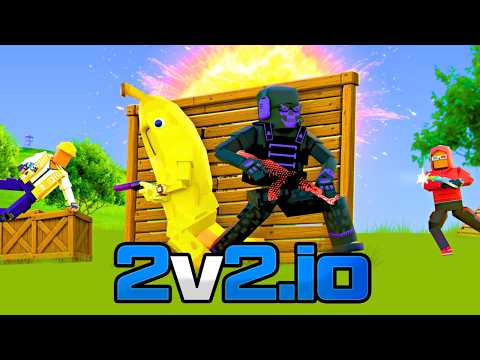
2v2.io Gameplay
Watch 2v2.io gameplay and learn the basics.
Frequently Asked Questions
Can I play 2v2.io with a friend?
Yes. The signature 2v2 mode is designed around duo teamwork, and the game includes friend, leaderboard, and clan features. Use the party or invite options shown in the current lobby, because the exact flow can change between versions.
Can I play 2v2.io on a phone or tablet?
The game supports touch devices, but aiming, inventory switching, and rapid building involve many inputs. Keyboard and mouse usually provide more precise control for competitive build fights.
Can I use a controller in 2v2.io?
Yes. 2v2.io supports gamepads. Connect the controller before loading the game, then confirm the detected buttons in Settings; keyboard and mouse may still feel faster for rapid building and editing.
Is 2v2.io free, and are purchases required?
You can enter the browser version for free. The game may show ads and offer coins, gems, shop items, or cosmetic unlocks, but optional purchases are not required simply to open and play the game. Check the current in-game store for exact items and prices.
Will my 2v2.io progress carry over to another browser or device?
Progress connected to the same game account is more likely to carry across browsers or devices. Guest or locally stored progress may not transfer and can be lost when browser data is cleared, so sign in before investing time in unlocks when the current version offers an account option.
What should I do if 2v2.io does not load?
Refresh the page and confirm that JavaScript and WebGL are enabled. If the screen stays blank, temporarily disable extensions that block scripts or embedded content, clear this page's cache, and try the latest Chrome or Edge browser.
How can I reduce lag or low frame rates in 2v2.io?
Close heavy browser tabs and background downloads, use a stable connection, and lower graphics or render-quality settings if the current version provides them. Reload the page after changing settings, and avoid running the game in multiple tabs at once.
What should I do if the game won't load, lags, shows a blank screen, or won't start?
Try one of these four steps:
- Clear your browser cache, then reload the game.
- Open the game in an incognito or private browsing window.
- Try a different browser, such as Microsoft Edge or Google Chrome.
- On the game cover, click Primary in the top-right corner and select a different game source, if available.
What should I do if matchmaking stays on "Connecting" or the loading circle keeps spinning?
Matchmaking can take longer when fewer players are online or when servers are busy. A persistent "Connecting" message can also indicate a connection or server issue. Try these options:
- Recommended: on the game cover, use the source selector in the top-right corner (usually labeled Primary) to try another available game source. This may help if the current source is having connection issues, but different sources may share the same matchmaking servers. If no other source is available, try the options below.
- Browse Similar Games on this site and try a similar game while you wait.
- Choose a Single Player game that does not require matchmaking. PvE games may also be suitable, but check that they support solo play: a PvE tag alone does not guarantee single-player or offline play.



Leave a Comment
Comments (0)