

















Plunder.be

- Developer
- igotlagg
- Load Speed
- Not specified
- Release Date
- Jun 2026
- Last Updated
- Play Mode
- Online Multiplayer
- Local Players
- 1 Player
- Controls
- Keyboard & Mouse, Touch Controls
- Perspective
- Top-Down
What Is Plunder.be?
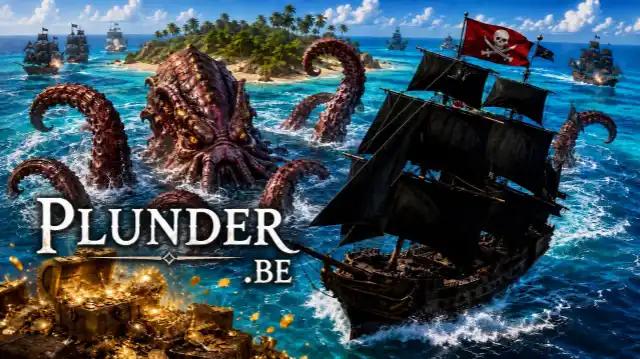
Plunder.be is an online pirate ship combat game with a top-down camera and 3D ships. Sail the sea, collect cargo, battle rival captains and AI vessels, and grow from a small ship into a stronger warship.
Its defining mechanic is broadside combat: your standard cannons fire from the sides, so turning your hull into position matters as much as aiming. You can compete for points in free-for-all battles or work toward flag captures in the team mode. Salvaging, repairs, crafting and captain talents give you more to manage than simply firing at the nearest ship.
Game Background
Created by igotlagg, Plunder.be was publicly playable in June 2026. The developer later replaced its original 2D renderer with 3D visuals while retaining the overhead view and naval combat loop.
You may still see Plunder 2D in the browser title or loading screen. This refers to the same game; the newer presentation is also listed as Plunder - Online Pirate Battle.
Game Screenshots
How to Play Plunder.be
Choose Your Voyage
- Conquest / Free-for-All: every captain competes for themselves. Collect treasure, sink enemies and build your score on the leaderboard. The current lobby labels this voyage Conquest, while the battle HUD uses Free-for-All.
- Capture the Flag: steal the opposing faction's flag and return it while defending your own. Covering a carrier and protecting the return route matter more than chasing unrelated fights.
Sailing and Broadside Combat
You control your sails and heading separately. Raising sails gets you moving; steering changes which side of your ship faces an opponent. Keep track of your own cannon arc instead of treating the ship like a character that shoots directly forward.
Begin with ordinary round shot, then use crafted ammunition for particular situations. Chain shot damages sails, grapeshot suits close-range fighting, heated shot adds burning, and explosive shot deals splash damage. TNT barrels can be dropped behind your vessel. Special ammunition needs materials, so it is not an unlimited replacement for normal cannon fire.
Loot, Repairs and Trading
Salvage resource nodes and collect cargo from defeated ships. Safe havens are marked on the world map and let you sell plunder at a port. Your cargo also supplies crafting, so selling everything immediately is not always the best choice.
Hull repairs consume Wood. Keep a reserve if you expect another fight. Crafting has material requirements and a queue; a cancelled queued job returns its ingredients.
Captain Progression and Sea Events
Level-ups offer talent choices across Gunnery, Seamanship and Tactics. These branches cover weapons, hull strength, sailing and resource handling. Check what a talent actually does before committing to a build rather than assuming a larger ship solves every problem.
The sea also has events beyond ordinary ship duels. Watch for escorted treasure fleets and the Drowned Bells notices associated with the Kraken. Their rewards may be tempting, but moving toward an event can bring you into a busier part of the map.
Game Controls
These are the current desktop controls for a QWERTY keyboard. Check the in-game Controls & Keybinds panel if your layout differs.
Sailing and Combat
- W ↑ S ↓: raise and lower sails
- A ← D →: steer left and right
- Move Mouse: aim your cannons
- Left Click or ␣ Space: fire; hold Space for repeated broadsides
- 1–5: select cannonball type
- 6: drop a TNT barrel behind your ship
- R: repair using Wood; tap to toggle or hold to sustain
- Scroll Wheel or Numpad +/−: zoom in or out
Menus and Communication
- C: crafting
- T: view captain talents
- M: world map
- Y: trade at a port
- Q (hold): quick communication wheel; aim and release to send
- ↵ Enter: chat
- ⇥ Tab: switch chat channel
- Esc: close an open panel
Plunder.be Tips
- Plan the turn before the shot. A bow-first chase can leave your standard cannons pointing away from the target. Turn your flank into range before committing to a broadside.
- Save some Wood for the trip home. Spending your entire cargo on recipes can leave you unable to repair after the next exchange.
- Match ammunition to the job. Use chain shot against sails and save grapeshot for close encounters instead of spending special ammunition at unsuitable distances.
- Check the map before carrying valuable cargo across the sea. Identify a nearby safe haven and a return route before sailing toward a distant fleet or boss notice.
- Read your talent choices before the next engagement. Decide whether you need stronger guns, better survival or resource support; do not spend a level-up choice simply because it is available.
- Escort rather than crowd the flag carrier. Cover the route and watch approaching enemies so the carrier has room to sail home.
Frequently Asked Questions
How do I join a friend in Plunder.be?
Use Invite Friends in the lobby, then share the party invitation with your friend. Join Party accepts a friend's party code. The in-game share button also offers a link into the current match. These tools do not necessarily create a private server, so check the selected voyage before inviting people.
Can I play on a phone or tablet?
The current version offers Touch controls, and its updated listing supports mobile and tablet browsers in landscape. If the controls are detected incorrectly, open Settings and select Touch instead of Auto. Actual performance depends on the device; keyboard and mouse remain an available desktop option.
What should I change for an AZERTY keyboard?
Open Settings and choose AZERTY · ZQSD under Keyboard. QWERTY · WASD and automatic detection are also available, so you do not need to force the desktop instructions onto a different keyboard layout.
What can I do if loading stalls or the ocean is missing?
Reload the page, update your browser, and check whether an extension is blocking game resources or the connection. Try another current browser if necessary. The verified official site is an alternative place to check the current build; do not assume an old portal copy has the same version. No fixed loading time has been measured for this page.
How can I reduce graphics lag?
Open Settings and choose a lower Graphics preset, such as Low or Medium, rather than Ultra. Close other resource-heavy tabs. Settings explains that some 2D sharpness and antialiasing changes require a reload, while ocean and 3D quality changes apply immediately.
What if my ship gets stuck?
Settings has an Unstuck option, but it is labelled scuttle ship: it sacrifices the current vessel rather than simply moving it out of danger. Use it only if you accept losing that ship. Back to Main Menu is a separate option.
What should I do if the game won't load, lags, shows a blank screen, or won't start?
Try one of these four steps:
- Clear your browser cache, then reload the game.
- Open the game in an incognito or private browsing window.
- Try a different browser, such as Microsoft Edge or Google Chrome.
- On the game cover, click Primary in the top-right corner and select a different game source, if available.
What should I do if matchmaking stays on "Connecting" or the loading circle keeps spinning?
Matchmaking can take longer when fewer players are online or when servers are busy. A persistent "Connecting" message can also indicate a connection or server issue. Try these options:
- Recommended: on the game cover, use the source selector in the top-right corner (usually labeled Primary) to try another available game source. This may help if the current source is having connection issues, but different sources may share the same matchmaking servers. If no other source is available, try the options below.
- Browse Similar Games on this site and try a similar game while you wait.
- Choose a Single Player game that does not require matchmaking. PvE games may also be suitable, but check that they support solo play: a PvE tag alone does not guarantee single-player or offline play.









Leave a Comment
Comments (0)