

















BuildNow GG

- Developer
- BattleLab
- Load Speed
- Slow (3–5 min)
- Release Date
- Aug 2021
- Added Site
- Dec 19, 2025
- Play Mode
- Single Player, Online Multiplayer
- Local Players
- 1 Player
- Controls
- Keyboard & Mouse, Gamepad, APP
- Perspective
- Third-Person
What Is BuildNow GG?
BuildNow GG is a multiplayer third-person shooter from BattleLab that combines gunfights with instant building. During combat, you can place walls, floors, ramps, and roofs to block fire, take height, protect a route, or create a new angle.
The game is designed around competitive practice and short, skill-focused fights rather than long looting phases. You can enter public matches, train building and aim, or create a private room to play with friends. Mode availability can vary between the browser and mobile versions.
Who Made BuildNow GG?
BattleLab developed BuildNow GG and released it in August 2021. The game concentrates third-person shooting, rapid construction, and building edits into compact arenas where aim, mechanical speed, positioning, and close-range decisions matter immediately.
Unlike a traditional battle royale built around extended looting and survival, BuildNow GG works more like a competitive training ground. Most modes move players into combat quickly, making it useful for practising individual mechanics as well as fighting real opponents.
Maps, weapons, party limits, and modes have expanded over time. Browser and mobile builds may not always show exactly the same playlist, so the current in-game lobby is the best guide to what is available on your device.
Game Screenshots

How Does BuildNow GG Play?
The core fight
- Choose a public match, training map, or private room.
- Select a weapon that fits the current distance and angle.
- Place a wall or other cover as soon as an opponent gains the first shot.
- Use ramps to claim height and floors or roofs to protect exposed routes.
- Edit a structure to open a window, passage, or safer firing angle.
- Combine shooting, building, editing, and movement to complete the selected mode's survival, elimination, or team objective.
Main game modes
Freebuild
An open practice map for learning keybinds, build chains, edits, weapon switching, and relaxed PvP without a strict round timer.
V-Arena
A survival arena for one-on-one fights or multiplayer free-for-all battles where the final surviving player wins.
Realistic 1v1
A duel with more match-like pressure, including limited materials and fall damage in versions that support those rules.
BoxFight
Close-range combat inside tight structures, focused on wall control, quick edits, safe peeks, and accurate shotgun shots.
Aim Training
An offline-capable practice mode with stationary or moving targets for tracking, flick shots, target switching, and weapon familiarity.
Zone Wars
A moving-zone battle that recreates late battle royale pressure while several players rotate, build, edit, and fight.
Late Game Zone Wars
A tighter endgame variation where limited space and materials make route planning and efficient builds especially important.
Additional playlists such as Solo, Duo, Wild West, Red vs Blue, and BoxFight Zone Wars may appear in particular versions or rotations.
Weapons and loadout
- Pistols: steady follow-up damage at short to medium range.
- Assault rifles: sustained pressure across medium distances.
- Shotguns: high close-range damage for BoxFight and interior combat.
- Sniper rifles: long-range shots against exposed targets.
- Pickaxe and rotating weapons: the basic tool remains available, while some versions add SMGs, pump shotguns, or specialist launchers.
Game Controls
These are the common desktop defaults. BuildNow GG allows keybind, graphics, frame-rate cap, and HUD changes, so check Settings if your current version uses a different layout.
Movement
- W A S D or ↑ ← ↓ →: move
- ␣ Space: jump
- Move Mouse: look and aim
Building and editing
- Q: build a wall
- C: build a floor
- V: build a ramp
- ⇧ Left Shift: build a roof
- F: edit a structure; press it again to apply the edit
- Right Click: reset the current edit
- Scroll Wheel: scroll down to reset an edit quickly
Weapons
- Left Click: shoot
- Right Click: aim
- Z: select the pickaxe
- 1–5: select a weapon or equipment slot
Other functions
- B: use an emote
- P: open chat
- M: view the scoreboard
How Can You Improve at BuildNow GG?
Build reliable fundamentals
- Learn the position of the wall, floor, ramp, and roof before trying long build combinations.
- Move frequent building keys to comfortable positions instead of forcing yourself to keep every default.
- Warm up in Aim Training and Freebuild with moving targets, weapon switches, simple boxes, and clean edits.
- Practise the sequence build, edit, shoot, and reset until each step is controlled.
Take safer fights
- Place a wall before returning fire when the opponent already has the first shot.
- Use ramps for height, but keep checking the sides and space below you.
- Confirm the enemy's position before opening an edit, and do not peek through the same window repeatedly.
- After a shotgun shot, reset the structure quickly to reduce the opponent's return angle.
Match the decision to the mode
- Use rifles or snipers at range, assault rifles in the middle distance, and shotguns inside tight builds.
- Avoid purposeless building when materials are limited in Realistic 1v1 or late-game modes.
- Rotate early in Zone Wars, choose a protected route, and save materials for the final move.
- Prefer a stable frame rate over maximum visual quality when rapid edits and close-range aim feel inconsistent.
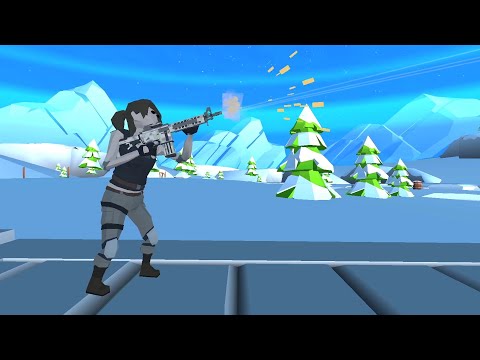
BuildNow GG Gameplay
Watch BuildNow GG gameplay and learn the basics.
Frequently Asked Questions
Can I play BuildNow GG with friends?
Yes. You can create a private party or room and invite friends instead of relying only on public matchmaking. The player limit depends on the selected mode, platform, and current version, so check the capacity shown in the lobby before inviting a larger group.
Can I play BuildNow GG on a phone or tablet?
Can I use a controller in BuildNow GG?
BuildNow GG supports controllers, but compatibility can vary by browser, device, and gamepad model. Connect the controller before loading the game and check the in-game controller settings if buttons are missing or mapped incorrectly.
Is BuildNow GG free, and does it include purchases?
The browser and mobile versions can be entered for free. Mobile versions may include advertising and optional in-app purchases; available items and current prices are shown by the relevant store and inside the game.
Can BuildNow GG be played offline?
Aim Training can be used for offline practice in supported versions. Public matchmaking, private rooms, and any mode involving other real players still require an internet connection.
Can I change the controls and performance settings in BuildNow GG?
Yes. You can customise keybinds, graphics quality, the frame-rate cap, and the HUD layout. Mobile versions also let you reposition and resize virtual controls, so the exact layout may differ from the desktop defaults listed above.
What should I do if BuildNow GG does not load?
Refresh the page, confirm that JavaScript, WebGL, and hardware acceleration are enabled, and check your connection. If it still fails, temporarily disable extensions that may block game resources, clear this page's cache, and try the latest Chrome or Edge browser.
What should I do if the game won't load, lags, shows a blank screen, or won't start?
Try one of these four steps:
- Clear your browser cache, then reload the game.
- Open the game in an incognito or private browsing window.
- Try a different browser, such as Microsoft Edge or Google Chrome.
- On the game cover, click Primary in the top-right corner and select a different game source, if available.
What should I do if matchmaking stays on "Connecting" or the loading circle keeps spinning?
Matchmaking can take longer when fewer players are online or when servers are busy. A persistent "Connecting" message can also indicate a connection or server issue. Try these options:
- Recommended: on the game cover, use the source selector in the top-right corner (usually labeled Primary) to try another available game source. This may help if the current source is having connection issues, but different sources may share the same matchmaking servers. If no other source is available, try the options below.
- Browse Similar Games on this site and try a similar game while you wait.
- Choose a Single Player game that does not require matchmaking. PvE games may also be suitable, but check that they support solo play: a PvE tag alone does not guarantee single-player or offline play.






Leave a Comment
Comments (0)