


















Pixel Combat: Zombies Strike

- Developer
- Mirra Games
- Load Speed
- Slow (3–5 min)
- Release Date
- May 2025
- Added Site
- Jun 12, 2025
- Play Mode
- Single Player
- Local Players
- 1 Player
- Controls
- Keyboard & Mouse, Touch Controls
- Perspective
- First-Person
What Is Pixel Combat: Zombies Strike?
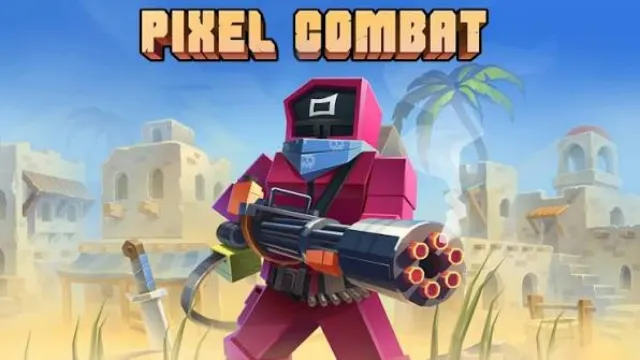
Pixel Combat: Zombies Strike is a single-player first-person zombie shooter built around wave survival and shelter defense. You board up entrances, repair barricades, manage ammunition, craft weapons, and fight increasingly dangerous enemies in a blocky pixel world.
The long-term objective is to explore missions, recover resources and secrets, defeat bosses, and assemble a time machine that may save humanity. The current game advertises more than 110 missions, 40 three-dimensional locations, 120 hidden rooms and secrets, 60 weapons, 150 weapon skins, 20 character skins, and 80 achievements.
Who Made Pixel Combat: Zombies Strike?
The browser edition is listed under Mirra Games and was released on browser portals in May 2025. The older mobile editions use different storefront developer names—Studio WW Games on Google Play and PSV Studio on the App Store—while sharing the same core zombie-defense game.
Years of mobile updates expanded the original house-defense loop into a larger campaign with mission maps, base systems, crafting, bosses, secrets, achievements, character profiles, optional aim assistance, and a continuing time-machine story. The main game remains single-player PvE rather than real-time cooperative multiplayer.
Game Screenshots
How Does Pixel Combat: Zombies Strike Play?
Mission and survival loop
- Select a mission and equip weapons suited to its expected range and enemy density.
- Search the location for resources, ammunition, secrets, and useful defensive positions.
- Repair or reinforce entrances before the next wave reaches the shelter.
- Eliminate normal zombies while preserving stronger ammunition for special enemies and bosses.
- Use each break between waves to reload, heal, repair, and reorganise weapons.
- Return to the base to craft supplies, claim rewards, improve equipment, and advance the time-machine project.
Wave defense and barricades
Zombies attack through doors, windows, and other entry points. Barricades slow the horde, concentrate targets into manageable lanes, and protect important parts of the shelter, but sustained attacks eventually destroy them. Checking every entrance between waves is safer than trying to recover an entire room after a breach.
Later waves introduce faster, tougher, and specialised enemies. A good defensive position has clear firing lanes and at least one escape route; standing in a dead end turns a single broken barricade into an immediate surround.
Weapons, crafting, and resources
The 60-plus weapon arsenal includes knives, axes, pistols, rifles, shotguns, submachine guns, machine guns, a flamethrower, a minigun, and other specialised weapons. Pistols and melee weapons conserve ammunition against isolated weak enemies, rifles cover medium range, shotguns dominate narrow entrances, and heavy automatic or flame weapons control dense groups.
Mission materials can be turned into weapons, ammunition, and survival supplies. Crafting one expensive weapon is not automatically useful if you cannot keep it supplied, so divide resources between damage, ammunition, healing, and shelter readiness.
Bosses, secrets, and the time machine
Bosses have larger health pools and special attacks that punish stationary firing. Watch for attack cues, keep an escape route open, clear ordinary zombies when they restrict movement, and save high-damage ammunition and healing for the safest damage windows.
Hidden rooms and secret routes can contain rare materials, weapons, rewards, or story details. Search only after nearby enemies are controlled so that inspecting an object or wall does not leave your back exposed. Mission rewards and discoveries gradually supply the resources and parts needed to construct the story's time machine.
Base and long-term progress
Between missions, the base supports equipment management, ammunition crafting, achievements, profiles, supply collection, cosmetic changes, and story progress. Some versions also include separate roguelike rules with random upgrades and an ultimate ability; availability and exact behaviour can differ by platform and update.
Game Controls
These are the common desktop browser controls. Mode-specific actions and mobile layouts may differ, so current on-screen prompts take priority.
Movement and aiming
- W A S D: move
- ␣ Space: jump
- Move Mouse: look around and aim
- Tab: release or restore the mouse cursor
Combat and survival
- Left Click: fire
- Right Click: aim or use a scope
- R: reload
- Q: use a first-aid kit
- 1–6: select a weapon slot
- F: use the ultimate ability in supported roguelike modes
- P: pause in supported roguelike modes
On phones and tablets, use the virtual joystick and on-screen buttons for movement, aiming, firing, jumping, reloading, healing, and weapon selection. Some versions provide optional auto-fire and aim assistance in the settings.
How Can You Survive Later Waves?
- Inspect every entrance before a wave. A neglected side window can collapse while your attention is fixed on the main door.
- Reload during safe intervals. Start each attack with full magazines instead of discovering an empty weapon after the first barricade breaks.
- Save heavy ammunition for real threats. Use economical weapons against ordinary zombies and keep the minigun or other expensive firepower for bosses and dense groups.
- Eliminate fast enemies first. They shorten your reaction time and are most likely to turn a controlled lane into a close-range emergency.
- Use narrow entrances to group the horde. Shotguns, machine guns, and the flamethrower become more efficient when enemies cannot spread out.
- Defend from a position with an exit. Firepower cannot help if the player is trapped in a corner during a breach.
- Aim for vulnerable areas. Accurate head-level fire can shorten fights and reduce the ammunition spent on ordinary targets.
- Balance weapon and ammunition crafting. Confirm that you can supply a new weapon before using all materials to unlock it.
- Repair before the defense disappears. Maintaining an existing barricade is usually cheaper than clearing zombies after they enter the shelter.
- Clear the room before searching for secrets. Exploration is safest when no nearby enemy can attack from behind.
- Keep healing for a meaningful threshold. Use a first-aid kit in safety or before a boss when the missing health could decide the next hit.
- Read boss attack cues. Dodging a special attack is more valuable than continuing to fire through an unsafe animation.
Frequently Asked Questions
Can I play Pixel Combat: Zombies Strike for free in a browser?
Yes. The browser edition can be played through a supported modern browser. Mobile editions are also available with optional advertising and in-app purchases.
Is Pixel Combat: Zombies Strike an offline single-player game?
Its core campaign and zombie-defense gameplay are single-player and the mobile edition advertises offline support. Online events, purchases, account services, or reward features may still require a connection.
Can I play Pixel Combat: Zombies Strike with friends?
The main game is not a real-time cooperative shooter. Its core missions, base defense, crafting, and boss battles are designed for one player.
Can I freely build a house in Pixel Combat: Zombies Strike?
No. Barricades and shelter improvements are defensive systems tied to missions and progression; this is not an unrestricted sandbox building game.
Does Pixel Combat: Zombies Strike support auto-fire?
Some mobile versions provide optional auto-fire and aim assistance. Their availability and exact behaviour depend on the current platform and settings.
Why can I craft a weapon but still struggle to use it?
Powerful weapons require a sustainable ammunition supply. Reserve enough materials for ammunition, healing, and defense rather than spending everything on the weapon itself.
Do weapon and character skins increase damage?
Skins mainly change appearance. Weapon effectiveness comes from its type, level, damage, fire rate, magazine, and other listed statistics.
Why do later waves and bosses feel much harder?
Enemy health, speed, numbers, and special abilities increase as missions advance. Upgrade useful weapons, repair every entrance, save heavy ammunition, and preserve an escape route.
What can I do if Pixel Combat: Zombies Strike loads slowly?
Close demanding tabs, lower graphics settings, update the browser, and enable hardware acceleration. On mobile devices, free memory and use a stable connection before loading new locations or online features.
What should I do if the game won't load, lags, shows a blank screen, or won't start?
Try one of these four steps:
- Clear your browser cache, then reload the game.
- Open the game in an incognito or private browsing window.
- Try a different browser, such as Microsoft Edge or Google Chrome.
- On the game cover, click Primary in the top-right corner and select a different game source, if available.
What should I do if matchmaking stays on "Connecting" or the loading circle keeps spinning?
Matchmaking can take longer when fewer players are online or when servers are busy. A persistent "Connecting" message can also indicate a connection or server issue. Try these options:
- Recommended: on the game cover, use the source selector in the top-right corner (usually labeled Primary) to try another available game source. This may help if the current source is having connection issues, but different sources may share the same matchmaking servers. If no other source is available, try the options below.
- Browse Similar Games on this site and try a similar game while you wait.
- Choose a Single Player game that does not require matchmaking. PvE games may also be suitable, but check that they support solo play: a PvE tag alone does not guarantee single-player or offline play.







Leave a Comment
Comments (0)