















Last Light
- Developer
- AZGames
- Load Speed
- Not specified
- Release Date
- Oct 15, 2026
- Added Site
- Oct 17, 2026
- Play Mode
- Single Player
- Local Players
- 1 Player
- Controls
- Keyboard & Mouse
What Is Last Light?
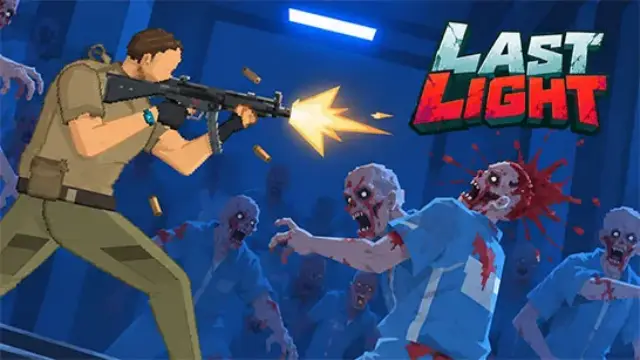
Last Light is a 2D side-scrolling zombie survival game set in an underground laboratory. Your goal is to escape, but shooting is only part of the job: ammunition, money, time and electricity all limit how far you can push.
Search the facility while conditions are manageable, then turn what you find into a stronger defense before night attacks. The tension comes from deciding whether another room is worth exploring when your battery, supplies or preparation time are running low.
Game Screenshots
How to Play Last Light
Search with a Purpose
Move between laboratory rooms using stairs and elevators. Inspect desks for color-coded keycards that open restricted areas, and collect supplies along the way. New access is useful only if you can survive the journey back or prepare at your next position.
Keep Three Systems Supplied
The generator feeds a battery shared by lighting, security and the elevator. Lights make searching safer, security supports your defenses, and elevator power helps you move toward escape. Watch the battery rather than committing all available energy to one system.
Turn Coins into Survival
Spend collected coins on weapons, character improvements and defensive equipment. Turrets can cover an entrance, while barricades slow enemies in narrow routes. Neither replaces preparation: check your ammunition and power before leaving a defended position for another search.
Game Controls
Use a keyboard and mouse for the desktop version. When an object offers several actions, follow its on-screen prompt.
- W A S D: move and navigate stairs
- ⇧ Shift: move faster
- Right Click: aim
- Left Click: shoot
- R: reload; take or use an item when prompted
- E: interact with objects and equipment
- Middle Click: kick or cancel an action
Last Light Survival Tips
- Give each trip a stopping point. Decide which room or locked route you want to investigate, then return before a short search leaves you unprepared for night.
- Reserve energy for your next move. A brightly lit room is not enough if the elevator has no power when you need to leave.
- Defend a route, not an empty room. Place barricades and turrets where approaching zombies must pass so your spending protects a useful entrance.
- Reload before a breach. Use the delay bought by a door or barricade to prepare your weapon instead of waiting until enemies reach you.
- Buy for the problem ending your runs. If your weapon cannot clear enemies, improve it; if you are caught without time to react, strengthen the threatened entrance instead of buying at random.
Frequently Asked Questions
Can I choose an easier difficulty for my first run?
Yes. Easy, Normal and Hard are available when starting a run. Start on Easy if you want more room to learn the laboratory systems before tackling a harder escape.
Does every upgrade disappear when an escape attempt fails?
Weapon proficiency and combat mastery can carry over between attempts. That does not mean your whole inventory or every purchase is permanent, so check the upgrade description before spending.
Do I need a Windows client or a mobile app to play?
No separate client is needed for the browser version. Use the game area on this page; a keyboard and mouse are the supported controls listed here.
What should I do if the game won't load, lags, shows a blank screen, or won't start?
Try one of these four steps:
- Clear your browser cache, then reload the game.
- Open the game in an incognito or private browsing window.
- Try a different browser, such as Microsoft Edge or Google Chrome.
- On the game cover, click Primary in the top-right corner and select a different game source, if available.
What should I do if matchmaking stays on "Connecting" or the loading circle keeps spinning?
Matchmaking can take longer when fewer players are online or when servers are busy. A persistent "Connecting" message can also indicate a connection or server issue. Try these options:
- Recommended: on the game cover, use the source selector in the top-right corner (usually labeled Primary) to try another available game source. This may help if the current source is having connection issues, but different sources may share the same matchmaking servers. If no other source is available, try the options below.
- Browse Similar Games on this site and try a similar game while you wait.
- Choose a Single Player game that does not require matchmaking. PvE games may also be suitable, but check that they support solo play: a PvE tag alone does not guarantee single-player or offline play.




Leave a Comment
Comments (0)