

















Mini Royale: Nations

- Developer
- Faraway
- Load Speed
- Slow (3–5 min)
- Release Date
- Dec 16, 2021
- Added Site
- Jun 12, 2025
- Play Mode
- Online Multiplayer
- Local Players
- 1 Player
- Controls
- Keyboard & Mouse
- Perspective
- First-Person
What Is Mini Royale: Nations?
Mini Royale: Nations is a free multiplayer first-person shooter that runs in a desktop browser. Its compact maps and short matches support familiar arena modes such as Team Deathmatch, Free For All, and Capture the Flag, alongside a smaller Battle Royale format and rotating events.
The shooting is only one part of the game. Accounts can also progress through seasonal challenges, a Battle Pass, heroes, weapon skins, collections, clans, Clan Wars, World Domination, and the Fusion Lab. These longer-term systems are optional layers around the core online FPS rather than a requirement for entering an ordinary match.
Who Made Mini Royale: Nations?
Mini Royale: Nations was developed by Faraway. After an open beta, the game officially launched on December 16, 2021 and expanded from a lightweight browser shooter into a seasonal game with social, collection, and clan-strategy systems.
The word Nations reflects the strategic layer built around the matches. Players earn progress and activity rewards through shooting modes, while clans coordinate raids, compete on leaderboards, and use event resources in territory-focused systems such as World Domination. Features, rewards, and available playlists can change between seasons, so current in-game descriptions take priority over older announcements.
Game Screenshots

How Does Mini Royale: Nations Play?
Core combat
Matches use first-person movement and mouse aiming across relatively compact maps. Assault rifles, SMGs, shotguns, sniper rifles, pistols, grenades, smoke, and other mode-specific equipment cover different ranges. Arena playlists usually return defeated players to the action quickly, while Battle Royale makes positioning, ammunition, healing, and survival more important.
Main game modes
- Team Deathmatch: two teams score through eliminations, making it the best starting point for learning recoil, routes, and spawn pressure.
- Free For All: every other player is an opponent, rewarding awareness and fast recovery between fights.
- Capture the Flag: teams divide their attention between stealing the opposing flag, escorting the carrier, and protecting their own base.
- Battle Royale: a short survival match where players land, collect weapons and supplies, follow the safe area, and try to be the last survivor.
- Rotating and private matches: limited playlists can focus on a weapon or special rule, while private rooms let a host choose a map, mode, server, and available match parameters.
Battle Royale flow
- Choose a landing area and watch for nearby opponents.
- Secure a usable weapon, ammunition, and healing before chasing ideal equipment.
- Carry tools for more than one range and use buildings or terrain to break sightlines.
- Check the safe area early and rotate before the edge forces a predictable route.
- Only shoot loot drones when the reward is worth revealing your position.
- Preserve health and information for the final encounter instead of taking every optional fight.
Seasons, heroes, and collections
Matches, challenges, contracts, attendance rewards, and seasonal events can award experience, Battle Pass progress, currency, shards, heroes, or weapon skins. Heroes and weapons support collection and mastery systems, but official gear guidance states that Hero Power Level does not affect normal PvP combat. Permanent items and time-limited seasonal resources should therefore be treated separately.
Clans and World Domination
Clan Wars are recurring cooperative events in which members complete raids and activities to earn points and resources for a shared leaderboard. World Domination adds a turn-based strategic layer, allowing clans to spend event resources on economic buildings, defenses, or attacks against rival territory. Results depend on participation and resource planning as well as individual shooting performance.
Fusion Lab
Fusion recipes exchange specified heroes, weapon skins, shards, or other ingredients for a higher-rarity result. Ingredients are consumed, so check that the recipe is current and use duplicate or unwanted items before sacrificing anything in an active loadout or collection.
Game Controls
These are common desktop controls. Mini Royale: Nations supports configurable bindings, and Battle Royale or limited modes may add contextual actions, so confirm the current layout in Settings.
Movement and aiming
- W A S D: move
- ␣ Space: jump
- ⇧ Shift: run or walk according to the current binding
- Move Mouse: look around and aim
Combat and items
- Left Click: shoot
- Right Click: focus or aim down sights
- R: reload
- 1–5: select a weapon or item slot
- F: interact with or pick up an item
- X: use a healing item in supported modes
Information and menus
- Caps Lock: open the Battle Royale map
- Tab: view inventory or match information according to the mode
- H: use an emote or celebration
- Esc: open the menu
How Can You Improve at Mini Royale: Nations?
- Start with Team Deathmatch. Fast respawns provide more chances to practise aiming, recoil, routes, and reload timing in one session.
- Tune sensitivity before judging a weapon. Use a setting that allows a quick turn without making distant corrections unstable.
- Reload behind cover. If an enemy is already close, switching to a ready secondary can be safer than finishing the animation.
- Match the weapon to the distance. Use shotguns or SMGs up close, rifles at medium range, and sniper weapons across long sightlines.
- Carry ammunition and healing in Battle Royale. A rare weapon is not useful when its magazine and reserves are empty.
- Rotate before the safe area becomes urgent. Early movement gives you time to choose cover instead of entering through an opponent's prepared angle.
- Treat loot drones as noisy decisions. Check nearby windows and routes before firing, then leave the drop area quickly.
- Use smoke for objectives. It can cover a flag carrier, block a sniper, protect a pickup, or conceal a rotation.
- Move after an FFA elimination. Reload, check every approach, and avoid waiting in the same position for another player to pre-aim it.
- Check expiring resources. Spend or exchange seasonal and Clan War resources before a reset when their description says they will not carry over.
- Fuse only after checking every ingredient. Recipes consume their materials; protect unique or frequently used items.
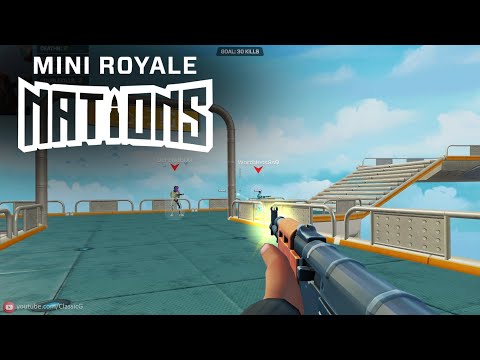
Mini Royale: Nations Gameplay
Watch Mini Royale: Nations gameplay and learn the basics.
Frequently Asked Questions
Is Mini Royale: Nations free to play?
Yes. You can play the core browser FPS without buying a digital collectible. Battle Pass offers, marketplace items, and other economy features are optional systems, so review their current terms separately before purchasing or connecting an external account.
Do I need to download Mini Royale: Nations?
No large client is required for the main version. It runs in a supported desktop browser, although the first visit still needs time to download maps, models, and other game data.
Can I play Mini Royale: Nations on a phone or tablet?
The official experience is presented as a desktop-browser game and its controls are designed around a keyboard and mouse. A phone or tablet should not be treated as a fully supported replacement unless the current official page explicitly offers a touch version.
Do I need an account to save progress?
Use an account if you want levels, rewards, collections, Battle Pass progress, and clan participation to remain associated with you. Guest access and login options can change, so follow the choices shown on the current sign-in screen.
Can I create a private Mini Royale: Nations match?
The game has supported private rooms where a host can choose a map, mode, server, and available rule adjustments, then share an invitation link. The exact room options and whether the playlist is currently available depend on the live version.
Does Hero gear make normal PvP pay to win?
Official gear documentation states that Hero Power Level does not affect normal PvP gameplay. Gear and Power Level belong to progression, collection, and other supporting systems rather than increasing ordinary match damage or health.
Can I recover items used in the Fusion Lab?
Do not assume so. Fusion consumes the ingredients specified by its recipe. Check the result and every selected material before confirming, especially when an item is unique, valuable, or part of a regular loadout.
What should I do if Mini Royale: Nations loads slowly or stutters?
Use a current desktop browser, enable JavaScript, WebGL, and hardware acceleration, and close memory-heavy tabs or programs. Lower resolution and visual quality for frame-rate problems, use a stable connection for online matches, and refresh after temporarily disabling extensions that may block game files.
What should I do if the game won't load, lags, shows a blank screen, or won't start?
Try one of these four steps:
- Clear your browser cache, then reload the game.
- Open the game in an incognito or private browsing window.
- Try a different browser, such as Microsoft Edge or Google Chrome.
- On the game cover, click Primary in the top-right corner and select a different game source, if available.
What should I do if matchmaking stays on "Connecting" or the loading circle keeps spinning?
Matchmaking can take longer when fewer players are online or when servers are busy. A persistent "Connecting" message can also indicate a connection or server issue. Try these options:
- Recommended: on the game cover, use the source selector in the top-right corner (usually labeled Primary) to try another available game source. This may help if the current source is having connection issues, but different sources may share the same matchmaking servers. If no other source is available, try the options below.
- Browse Similar Games on this site and try a similar game while you wait.
- Choose a Single Player game that does not require matchmaking. PvE games may also be suitable, but check that they support solo play: a PvE tag alone does not guarantee single-player or offline play.




Leave a Comment
Comments (0)