


















Poke Survivor

- Developer
- JPTER78
- Load Speed
- Not specified
- Release Date
- Oct 11, 2026
- Added Site
- Oct 17, 2026
- Play Mode
- Single Player, Online Multiplayer
- Local Players
- 1 Player
- Controls
- Keyboard & Mouse, Touch Controls
- Perspective
- Top-Down
Poke Survivor Overview
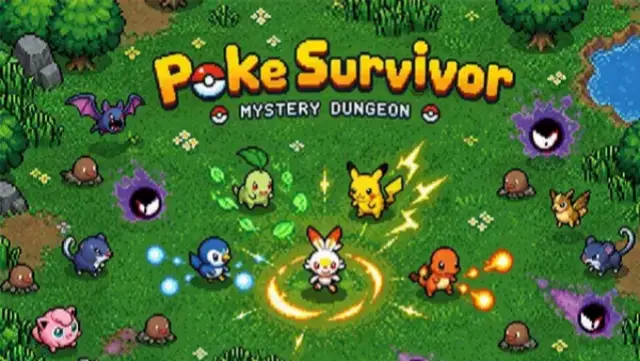
Poke Survivor is a top-down Pokémon survival fan game by JPTER78. Choose a partner, dodge wild Pokémon and collect experience while your selected move attacks automatically. Positioning, move choices and type matchups matter more than aiming a weapon.
Explore an expanding map, strengthen your attacks and enter optional legendary battles. You can play solo or cooperate online with up to four players, then build a collection of Pokémon and shiny forms between runs.
Game Screenshots
How to Play Poke Survivor
Keep an escape route through the horde
Move around the map to gather experience and avoid being surrounded. Enemies do more than chase: some heal allies, provide shields, summon help or mark the ground before attacking. Defeating the support enemies can make a crowded fight easier to manage.
Leveling up offers three cards for new moves, stronger attacks or stat improvements. Only your active move fires automatically, so switching slots changes how you fight; learning another move does not make every slot attack together.
Evolve moves and combine attacks
To evolve a move, upgrade it to its maximum level and obtain its required stat upgrade. For example, Ember needs Power before it can evolve into Fire Blast. A legendary victory can also offer a bond that combines moves in one slot, allowing the linked attacks to fire together.
Chests and bosses can provide held items, but you can keep only one at a time. Compare a new item's effect with your current build before replacing the old one. Locked chests require you to stay close while they open.
Challenge legendary rifts
Occasional rifts lead to separate arenas themed around Pokémon types. Their terrain and weather can change the fight: water slows movement, ice is slippery and lava causes damage. Win for a reward; defeat sends you back to the main map without the victory reward. In co-op, the group enters together.
Between runs, spend earned coins on permanent upgrades for your chosen Pokémon. Missions, achievements and collection rewards give you goals beyond simply surviving longer.
Poke Survivor Controls
Your Pokémon attacks automatically with the active move; there is no manual fire button.
- W A S D or ↑ ← ↓ →: Move.
- 1–4: Select the active move slot.
- Q / E: Cycle moves.
- Left Click on a move icon: Select that move. Click a level-up card to choose its reward.
- Esc: Open the pause menu.
On a phone or tablet, use landscape orientation and drag your finger to move. Tap a move icon to change attacks and use the on-screen pause button.
Poke Survivor Tips
- Upgrade with an evolution in mind. Check the move's required stat before taking unrelated cards. A fully leveled move still needs the matching upgrade to evolve.
- Use types instead of forcing one attack. Switch when the enemies ahead resist your current move. Rain favors Water and weakens Fire, while harsh sunlight reverses that advantage.
- Leave attack markers immediately. Filling circles and lines warn of incoming hits. Step out before returning for experience or loot.
- Make room before opening a chest. Draw the horde away first, then return when you can stay beside the locked chest without being surrounded.
- Check item trade-offs. Choice Band prevents move switching, while Life Orb spends health as you attack. Choose them only when your move and recovery options can support the cost.
Frequently Asked Questions
How do I play with friends?
Use an online account, add friends by their player nickname and invite them to your room. Co-op supports up to four players. Experience is shared, and you can revive a fallen teammate by staying next to them.
How do I keep my progress when changing devices?
Play with a username-and-password account or Google sign-in to save progress in the cloud. Guest play does not provide cloud saving, so do not rely on it when switching devices or clearing browser data.
How do I unlock more Pokémon?
Use tickets earned in play for region-based collection draws. Ordinary enemies can drop tickets, while bosses and rift legendaries can provide larger ticket rewards. Tickets are not sold for real money.
Do permanent upgrades apply to every Pokémon?
No. Each Pokémon has its own permanent upgrades. Bonuses bought for one partner do not automatically apply when you choose another.
How can I recover a forgotten password?
If you linked Gmail to the account, use Google sign-in with that same address. The official login screen warns that an unlinked account cannot be recovered this way, so link your Gmail while you can still access it.
What does the leaderboard measure?
The leaderboard tracks survival time rather than the number of coins you collect. Solo and group records are distinguished, so compare the relevant category rather than treating currency as your score.
What should I do if the game won't load, lags, shows a blank screen, or won't start?
Try one of these four steps:
- Clear your browser cache, then reload the game.
- Open the game in an incognito or private browsing window.
- Try a different browser, such as Microsoft Edge or Google Chrome.
- On the game cover, click Primary in the top-right corner and select a different game source, if available.
What should I do if matchmaking stays on "Connecting" or the loading circle keeps spinning?
Matchmaking can take longer when fewer players are online or when servers are busy. A persistent "Connecting" message can also indicate a connection or server issue. Try these options:
- Recommended: on the game cover, use the source selector in the top-right corner (usually labeled Primary) to try another available game source. This may help if the current source is having connection issues, but different sources may share the same matchmaking servers. If no other source is available, try the options below.
- Browse Similar Games on this site and try a similar game while you wait.
- Choose a Single Player game that does not require matchmaking. PvE games may also be suitable, but check that they support solo play: a PvE tag alone does not guarantee single-player or offline play.





Leave a Comment
Comments (0)