


















GoKarts.io
- Developer
- LEGION GAMES
- Load Speed
- Average (1–3 min)
- Release Date
- May 2025
- Last Updated
- Play Mode
- Online Multiplayer
- Local Players
- 1 Player
- Controls
- Keyboard & Mouse, Touch Controls
- Perspective
- Third-Person
What Is GoKarts.io?
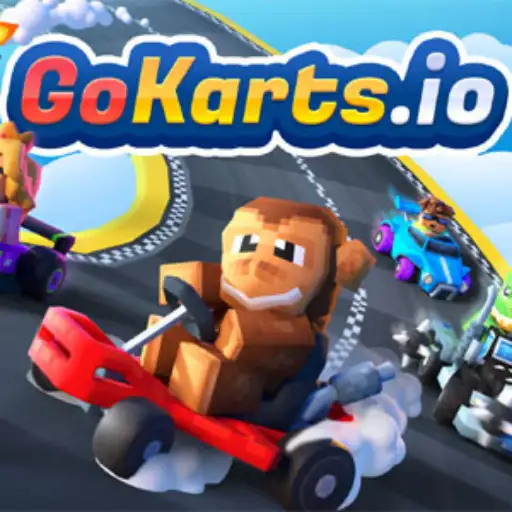
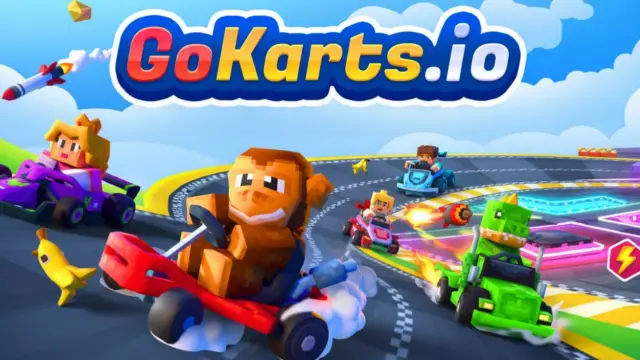
GoKarts.io is a real-time 3D multiplayer kart-combat game. Drivers move continuously through open arenas, collect mystery boxes, fire weapons, deploy defences, use nitro, and compete for a higher score.
This is not a traditional lap-time race. Route control, item timing, survival, and recovery after a hit matter as much as raw speed. Short matches are supported by levels, currencies, character tokens, garage customization, collectible rarities, and seasonal rewards.
Who Made GoKarts.io?
GoKarts.io was released by LEGION GAMES in May 2025. It combines accessible arcade steering with multiplayer arena combat, allowing a match to begin quickly while still rewarding route knowledge and item decisions.
Progression systems include player levels, match experience, coins, gems, character tokens, drivers, karts, wheels, hats, loot rewards, and several cosmetic rarities. Seasonal events can add themed arenas, characters, vehicle appearances, or other limited rewards.
The browser version supports desktop, phone, and tablet play. Available items, events, social features, and reward pools may change as new content is rotated into the game.
Game Screenshots
How Does GoKarts.io Play?
Match flow
- Select a driver and kart appearance, then join a multiplayer match.
- Keep moving through the arena and watch for mystery item boxes.
- Collect a random weapon or defensive power-up.
- Use the item when the target, route, and timing provide a real advantage.
- Spend nitro to chase, escape, reach another box, or clear danger.
- Score eliminations, stay active, and recover position after collisions or attacks.
- Finish the match to collect experience and available rewards.
Driving and arena routes
Karts can accelerate, reverse, and steer, but sharp corrections at high speed can cause collisions or lost momentum. Long straights favour nitro, narrow passages reward controlled steering, and ramps can cross obstacles or create a sudden height change. Map edges, walls, traffic, and crowded item routes create additional hazards.
Reverse is mainly a recovery tool for escaping a wall or blocked corner. During normal combat, planning a smooth forward route usually provides more speed, visibility, and item access.
Weapons and power-ups
- Missiles: work best on long approaches or in narrow spaces where the target has fewer escape options.
- Machine guns: reward a stable chase line and sustained contact with a nearby target.
- Shields: protect a vulnerable approach, an escape through traffic, or a push into a crowded fight.
- Traps: become harder to avoid behind corners, after ramps, beside boxes, or inside narrow entrances.
- Other items: can provide direct damage, area disruption, obstacles, defence, or movement support depending on the current version or event.
A mystery box does not guarantee a chosen item, so each pickup asks for a new plan. After using the held item, route toward another box instead of entering the next fight empty-handed.
Nitro and combat timing
Nitro is separate from the random item slot. Use it on a clear straight, before a useful ramp, to reach an item first, or to leave the centre of a fight. Boosting through a tight bend can waste speed or send the kart into a wall.
Attacks must account for both direction and relative speed. Lead a target that is crossing the arena, avoid sitting directly behind a driver who may drop a trap, and regain steering control before trying to counterattack after a heavy hit.
Progression and garage
Completed matches grant experience and can contribute to coins, gems, character tokens, drivers, karts, wheels, hats, and other collectibles. The garage combines owned drivers and vehicle cosmetics. These items are primarily visual and collectible; match results still depend on steering, route choice, item timing, and awareness.
Game Controls
These are the common desktop controls. Device prompts and current in-game settings take priority if the layout changes.
Driving
- W or ↑: accelerate
- S or ↓: brake or reverse
- A or ←: steer left
- D or →: steer right
- ⇧ Shift: use nitro
Items and view
- ␣ Space: use the held item
- Left Click: fire or use the held item
- R: change the camera view
- Esc: open the pause menu
Phones and tablets use on-screen steering, item, and nitro controls. Touch placement may differ with screen size, orientation, and the current build.
How Can You Improve at GoKarts.io?
- Do not spend every item immediately. A held shield, missile, or trap can be more valuable when a target or threat is actually present.
- Route toward the next box after firing. Staying armed reduces the time in which another driver can attack without a response.
- Boost on a readable line. Straights, open escapes, and prepared ramps convert more nitro into useful distance than blind bends.
- Delay the shield until pressure is real. Activate it when entering traffic, crossing danger, or seeing an attack rather than while alone.
- Hide traps beyond the driver's first view. Corners, ramp landings, narrow gates, and popular boxes give opponents less reaction time.
- Avoid a perfectly straight chase. Small controlled direction changes make long-range attacks harder without causing a crash.
- Leave room behind the target. Following directly on the bumper invites a trap or sudden braking move.
- Use solid objects as missile cover. A wall, ramp, or large obstacle can break the attack line if reached early enough.
- Plan the exit before joining the centre fight. Know which straight, ramp, or side lane can be used when several drivers turn toward you.
- Recover steering before retaliating. After a collision or hit, point the kart away from an edge or wall before using the next item.
- Learn recurring box routes. A loop through reliable pickup locations is stronger than wandering without an item.
- Finish the match even after a poor start. Random pickups and quick eliminations can change the score, while completion still contributes to progression.
Frequently Asked Questions
Is GoKarts.io free to play?
Yes. GoKarts.io can be played for free in a supported browser. Progression and collectible cosmetics do not remove the need to drive well and use items at the right time.
Do I need to download GoKarts.io?
No download is required for browser play. The game is available on desktop, phone, and tablet browsers and can also be accessed through the CrazyGames mobile app.
Can I choose which item comes from a mystery box?
Usually not. Mystery boxes provide a random weapon or power-up, so adapt the route and next engagement to the item you receive.
Do characters and kart cosmetics improve combat power?
Most drivers, karts, wheels, hats, and related garage items are cosmetic or collectible. Steering, positioning, item timing, and awareness remain the main competitive advantages.
Can I play GoKarts.io with friends?
GoKarts.io supports multiplayer and friend-oriented play. The exact party or join controls can differ between the current browser and mobile interfaces, so use the active lobby's invite options.
Does GoKarts.io work on phones and tablets?
Yes. Mobile devices use on-screen controls for steering, nitro, and items. Performance depends on available memory, graphics capability, network quality, and screen size.
Why can GoKarts.io take a while to finish loading?
The game must load 3D arenas, vehicles, characters, effects, sound, and multiplayer systems. A slow connection or limited device memory can make the final loading stage take longer.
Are seasonal rewards always available?
Not necessarily. Seasonal maps, characters, karts, hats, wheels, and other event rewards can be limited to a particular rotation and may become unavailable when that event ends.
What should I do if the game won't load, lags, shows a blank screen, or won't start?
Try one of these four steps:
- Clear your browser cache, then reload the game.
- Open the game in an incognito or private browsing window.
- Try a different browser, such as Microsoft Edge or Google Chrome.
- On the game cover, click Primary in the top-right corner and select a different game source, if available.
What should I do if matchmaking stays on "Connecting" or the loading circle keeps spinning?
Matchmaking can take longer when fewer players are online or when servers are busy. A persistent "Connecting" message can also indicate a connection or server issue. Try these options:
- Recommended: on the game cover, use the source selector in the top-right corner (usually labeled Primary) to try another available game source. This may help if the current source is having connection issues, but different sources may share the same matchmaking servers. If no other source is available, try the options below.
- Browse Similar Games on this site and try a similar game while you wait.
- Choose a Single Player game that does not require matchmaking. PvE games may also be suitable, but check that they support solo play: a PvE tag alone does not guarantee single-player or offline play.







Leave a Comment
Comments (1)
bah
Sep 22, 2026
bah