







Chunkstorm
- Developer
- rescoweb
- Load Speed
- Not specified
- Release Date
- 2026
- Last Updated
- Play Mode
- Single Player
- Local Players
- 1 Player
- Controls
- Keyboard & Mouse
- Perspective
- First-Person
What Is Chunkstorm?
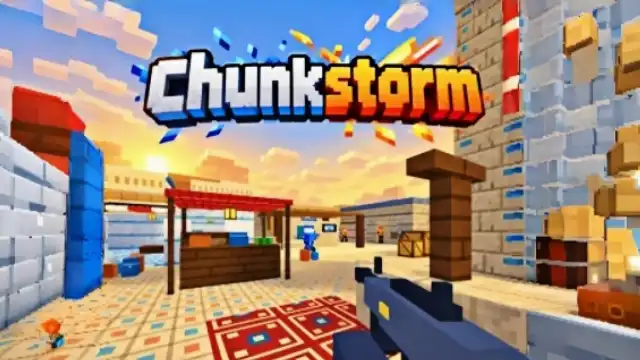
Chunkstorm is a first-person shooter with blocky voxel environments and bot battles. Choose a weapon and enter either a team fight or an everyone-for-themselves match. Compact maps give you several ways to approach a firefight, making route choice as useful as a quick reaction.
Game Screenshots
How to Play Chunkstorm
Pick a mode and a weapon
Team Deathmatch stages an 8v8 battle, while Free for All removes the protection of a team. These modes feature computer-controlled opponents. Choose from five primary weapons and use the map's cover and connecting routes to find a favorable approach.
Work toward missions and mastery
Playing matches and completing daily or weekly objectives earns coins and experience. Weapon mastery adds longer-term cosmetic targets, including Gold, Platinum, and Dark Matter finishes. Check each mission's requirement before changing your loadout; an objective may call for a different approach from the one you normally use.
Chunkstorm Controls
- W A S D: Move.
- Move Mouse: Look around.
- Left Click: Shoot.
- Right Click: Aim.
- R: Reload.
- Shift: Run.
- B: Switch weapons.
- Esc: Open the pause menu.
- F11: Toggle browser fullscreen.
Chunkstorm Tips
- Learn one route first. Repeat it with the same weapon so you can tell whether a lost fight came from poor aim, the wrong distance, or an exposed angle.
- Use the side routes. If a direct approach keeps failing, move around the cover rather than repeating the same exposed entry.
- Reload out of sight. Return to nearby cover before loading a fresh magazine, then approach from a different opening.
- Check the objective before a session. Pick a mission or mastery target you can work toward with your chosen weapon rather than switching gear without a purpose.
Frequently Asked Questions
Can I invite friends into Chunkstorm?
Private rooms and friend invitations are not established for this version. Treat it as a solo bot shooter rather than a game for organizing online matches.
Can I play Chunkstorm on a phone?
This version is designed for a desktop browser with a keyboard and mouse. Touch controls are not documented.
What should I do if the game won't load, lags, shows a blank screen, or won't start?
Try one of these four steps:
- Clear your browser cache, then reload the game.
- Open the game in an incognito or private browsing window.
- Try a different browser, such as Microsoft Edge or Google Chrome.
- On the game cover, click Primary in the top-right corner and select a different game source, if available.
What should I do if matchmaking stays on "Connecting" or the loading circle keeps spinning?
Matchmaking can take longer when fewer players are online or when servers are busy. A persistent "Connecting" message can also indicate a connection or server issue. Try these options:
- Recommended: on the game cover, use the source selector in the top-right corner (usually labeled Primary) to try another available game source. This may help if the current source is having connection issues, but different sources may share the same matchmaking servers. If no other source is available, try the options below.
- Browse Similar Games on this site and try a similar game while you wait.
- Choose a Single Player game that does not require matchmaking. PvE games may also be suitable, but check that they support solo play: a PvE tag alone does not guarantee single-player or offline play.
Leave a Comment
Comments (0)